
The ultimate guide to comparing embedded analytics solutions

- Blog
- Embedded Analytics
“Thirty percent of chief data and analytics officers (CDAOs) said their top challenge is the inability to measure data, analytics, and AI impact on business outcomes.”
In this guide, we look at the most important capabilities organizations should evaluate when selecting an embedded analytics solution. By understanding how different platforms support AI-powered insights, developer-friendly integration, customization, and scalable data architectures, product and engineering teams can choose what will help them build the data-driven applications they envision.
Overview
By delivering analytics to customers through embedded analytics in their existing products, organizations improve customer satisfaction and drive new revenue streams. Data has become a critical differentiator, helping companies deliver smarter applications, better customer experiences, and entirely new product capabilities.
As a result, analytics are rapidly moving beyond standalone dashboards and reports. Instead of asking users to leave their workflows to analyze data in a separate tool, organizations are embedding analytics directly into the applications people use every day. These embedded analytics experiences allow users to access insights in context, within their workflows where they’re making decisions.
This shift is accelerating as AI transforms how people interact with data. AI-powered analytics can quickly surface insights, explain trends, detect anomalies, and enable natural language interaction with data. By reducing the technical barrier to analytics, these capabilities make insights accessible to a broader range of users and enable teams to deliver more intelligent, data-driven product experiences.
At the same time, product teams and developers are under increasing pressure to deliver these capabilities quickly. Building analytics infrastructure internally—data pipelines, modeling layers, visualization components, scalability frameworks, and AI capabilities—is still complex and resource-intensive. As a result, many organizations are adopting analytics platforms that allow them to embed analytics directly into their apps, without building every component from scratch.
This shift has led to the emergence of a new category of analytics platforms designed specifically for modern applications. These platforms combine scalable cloud architecture, flexible APIs, developer tools, and AI-powered analytics capabilities to help organizations build data-driven product experiences. Instead of delivering analytics as a separate tool, these platforms let teams integrate intelligence directly into their products and workflows.
Comparison points: Definitions
- AI-powered analytics
- Capabilities that use artificial intelligence to simplify analytics creation, exploration, and interpretation. These include natural language query (NLQ), AI-generated visualizations, automated insights, anomaly detection, narrative explanations, and conversational analytics experiences that allow users to interact with data using natural language.
- Agentic and proactive analytics
- Advanced AI capabilities that monitor data continuously, detect anomalies, generate recommendations, and suggest next analytical steps. These systems proactively surface insights, monitor KPIs, and assist users with follow-up analyses.
- Predictive analytics
- Built-in capabilities that allow users to forecast trends, detect patterns, and build predictive models using statistical or machine learning algorithms. Platforms may provide zero-code, low-code, or code-first approaches for developing predictive models.
- Builder tools for analytics creators
- Capabilities that enable developers, product teams, analysts, and other creators to build analytics experiences using no-code, low-code, and pro-code approaches—including AI-powered features like natural language querying and automated insights. These tools include visual builders, scripting environments, SDKs, APIs, and Notebooks for custom code development.
- Deployment flexibility
- The ability to deploy analytics infrastructure across different environments, including public cloud, private cloud, hybrid environments, or vendor-managed cloud services.
- Deployment management
- Methods for provisioning, managing, and scaling analytics infrastructure, including Kubernetes support, DevOps integration, automated deployment pipelines, and managed service options.
- Data architecture
- The underlying architecture used to process queries, manage datasets, and deliver analytics. Platforms may support in-memory, in-database, or hybrid approaches that combine query pushdown with caching and acceleration layers.
- Data connectivity and integration
- The ability to connect to a wide range of data sources such as cloud data warehouses, operational databases, APIs, SaaS applications, and files.
- Data preparation and modeling
- Capabilities used to clean, transform, join, and model data prior to analysis. These capabilities may include visual modeling tools, SQL-based modeling, AI-assisted data preparation, and automated data blending.
- Semantic data layer
- A logical abstraction layer that standardizes metrics, relationships, and business logic across datasets. This layer enables consistent analytics and supports advanced use cases while allowing users to explore data dynamically.
- Self-service analytics and exploration
- The ability for end-users to independently explore data, filter datasets, drill into details, create reports, or build dashboards without requiring assistance from data engineers or analysts.
- Collaboration and sharing
- Capabilities that allow users to share dashboards, reports, and insights with colleagues or customers through links, embedded experiences, or automated distribution.
- Alerts and proactive monitoring
- Capabilities that allow users to configure alerts when metrics reach defined thresholds or when anomalies occur. Alerts may be delivered via email, messaging platforms, or in-product notifications.
- Workflow actions and automation
- The ability to trigger actions or workflows directly from analytics. Examples include sending data to external systems, triggering operational workflows, or automating decision processes and connecting analytics to external AI agents and development tools that can act on insights or automate platform operations.
- Embedding and integration
- Capabilities that allow analytics to be embedded directly into applications, portals, or digital products using APIs, SDKs, and embeddable components.
- Customization and white-labeling
- Capabilities that allow organizations to customize the appearance, functionality, and behavior of analytics experiences so they match the host application’s branding and user experience.
- Authentication and permissioning
- Security and governance capabilities that control which users can access specific analytics assets or datasets. These include role-based access control, row-level security, and single sign-on (SSO) integrations.
- Multi-tenant architecture
- Capabilities that allow organizations to support multiple customers or tenants within a single analytics environment while maintaining secure data isolation.
- Performance and scalability
- The ability to deliver fast query performance and consistent user experiences as data volumes, query complexity, and concurrent users increase.
- Automation and extensibility
- API-driven capabilities that allow teams to automate analytics operations, integrate analytics into CI/CD workflows, and extend platform capabilities.
- Monitoring and observability
- Tools that provide visibility into system performance, query execution, usage patterns, and resource consumption, including AI-driven monitoring to ensure reliability and scalability.
- Time to value
- The time required to deploy the platform, integrate data, and deliver analytics experiences to users or customers.
- Total cost of ownership (TCO)
- The total cost required to operate and scale an analytics platform over time, including infrastructure, engineering resources, maintenance, and additional tools.
- LLM flexibility and AI infrastructure
- The ability to choose and manage the AI models that power analytics capabilities. Platforms may support bringing your own LLM, offer a vendor-managed LLM service, or require organizations to build and maintain their own AI infrastructure.
- Run a proof of concept using your own data to evaluate performance, usability, and how quickly the platform can support your product roadmap.
- Include cross-functional stakeholders in the evaluation process, including product, engineering, data, and customer-facing teams.
- Test the platform with multiple user roles, from developers and data engineers to analysts and end-users, to ensure it supports the full analytics lifecycle.
- How easily users can explore and interact with data, both for internal teams and for the customers who will use analytics inside your product.
- How the platform enables advanced capabilities such as AI-powered insights, predictive analytics, and natural language interaction with data.
- How flexible the platform is when embedding analytics into your application, including customization, white-labeling, and integration with existing workflows.
- How well the platform will scale over time as data volumes, product complexity, and user adoption grow.
Approaches to embedding analytics in today’s applications
As companies build more data-driven products, lots of teams initially attempt to embed analytics using tools that weren’t designed for customer-facing analytics experiences. While these approaches can work for basic reporting, they usually cause headaches as apps grow, data volumes increase, and users expect more advanced insights.
Let’s take a look at the most common approaches organizations take to embed analytics, and what works and doesn’t work about them. This’ll help you evaluate which platforms will best support your long-term product strategy.
Embedding analytics using visualization or BI tools
Many teams begin by embedding analytics using visualization or business intelligence tools that were originally designed for internal reporting, rather than external end-user experience. These tools often provide attractive dashboards and charts that can be embedded into applications using simple methods such as iframes.
While visual dashboards can help users monitor key metrics, these tools are optimized for internal analysts rather than product teams building customer-facing analytics. So, as orgs scale their products, they encounter limitations in customization, integration flexibility, and multi-tenant data management.
In embedded use cases, the user experience becomes critical. Why? The analytics experience is part of the product itself. Visualization tools that were designed for standalone dashboards likely require significant engineering effort, additional infrastructure, and supporting data tools to deliver the level of performance, customization, and scalability that today’s applications (and more importantly, today’s users) demand.
Embedding analytics using traditional analytics platforms
Some organizations adopt more robust analytics platforms that offer stronger data modeling, centralized governance, and broader analytical capabilities. These platforms are often designed for data analysts and business intelligence teams responsible for managing organizational reporting. Again, notice that they’re not designed for embedded analytics within an app for a tailored end-user experience.
While these platforms may provide more advanced data management and analytics capabilities than visualization tools, they can still cause challenges when used to power product analytics experiences. Many require significant engineering involvement to customize analytics workflows, integrate analytics into applications, or scale across large numbers of external users.
Again, because these platforms were designed primarily for internal analytics environments, product teams usually still face constraints when trying to deliver highly customized analytics experiences to their end users, within their apps.
Modern embedded analytics platforms
Modern embedded analytics platforms are designed specifically to support the analytics component of an app or product. Rather than delivering analytics as a standalone reporting interface, separate from the main function of the product, these platforms provide APIs, SDKs, and other developer tools that allow analytics to be integrated directly into applications and workflows, as if they’re part of that product. Indeed, a key benefit of the strongest embedded analytics platforms is their ability to be fully customized to have the exact look and feel of the product they’re being integrated with.
In addition to customization, these platforms support capabilities like white-labeling and flexible integration approaches that allow end-user analytics experiences to match the look and feel of the host application. They’re also designed to support common embedded analytics requirements such as multi-tenancy, automation, and scalable performance.
Modern platforms incorporate AI-powered capabilities that help users interact with data more naturally. Capabilities can include natural language queries, automated insights, predictive analytics, and contextual explanations that help users understand trends and patterns in their data.
This evolution has led to the emergence of embedded analytics platforms that combine scalable cloud architecture, AI-powered analytics, and developer-friendly integration tools to help organizations embed intelligence across modern digital products. Instead of simply delivering dashboards, these platforms enable product teams to build data-driven experiences that guide users toward better decisions within their everyday workflows.
Comparing embedded analytics solutions: Sisense vs. alternatives
| Comparison point | Traditional BI and analytics platforms | Sisense embedded analytics | Business benefits with Sisense |
|---|---|---|---|
| AI-powered analytics experiences | Limited AI capabilities focused on basic insights or external integrations | Sisense Intelligence includes AI assistant, narrative summaries, natural language queries, AI-generated visualizations, and conversational analytics with flexible LLM options | Accelerates insight discovery and reduces technical barriers without managing AI infrastructure |
| Agentic and proactive analytics | Primarily manual dashboards and user-driven exploration | AI proactively surfaces insights, monitors KPIs, and enables LLM tools to securely query governed data models via MCP server | Delivers insights automatically and enables action without manual exploration |
| Predictive analytics | Often requires external tools or advanced scripting | Built-in forecasting and predictive modeling with no-code, low-code, and code-first options | Advanced analytics accessible without dedicated data science teams |
| Builder tools for creators | Separate tools for business users and developers | No-code, low-code, and pro-code tools with AI assistant for natural language dashboard creation | Enables collaboration across teams without increasing engineering workload |
| Deployment flexibility | Often tied to specific environments | Supports public cloud, private cloud, hybrid, on-premises, and managed cloud | Future-proof infrastructure |
| Comparison point | Traditional BI and analytics platforms | Sisense embedded analytics | Business benefits with Sisense |
| Deployment management | Requires manual infrastructure management | DevOps-friendly with Kubernetes, APIs, and managed service options | Reduces operational overhead |
| Data architecture | In-memory or in-database only | Hybrid architecture with live queries and high-performance caching (Sisense Analytical Engine) | Optimized performance and lower costs |
| Data connectivity and integration | Limited or requires extra tools | Extensive connectors for warehouses, SaaS apps, databases, and APIs | Unified data for richer insights |
| Data preparation and modeling | Heavy SQL or external ETL tools required | Visual modeling, AI-assisted prep, and code-first options (SQL, Python, R) | Supports technical and non-technical users |
| Semantic data layer | Tightly coupled with data models | Decoupled semantic layer with reusable models and AI-driven insights | Consistent metrics with flexible exploration |
| Comparison point | Traditional BI and analytics platforms | Sisense embedded analytics | Business benefits with Sisense |
| Self-service analytics and exploration | Limited to predefined dashboards | Dynamic exploration with AI-powered insights and narrative summaries | Increases engagement and reduces dependency on analysts |
| Collaboration and sharing | Varies or depends on external tools | Sharing via links, email, embedding, and external distribution | Easy insight distribution |
| Alerts and proactive monitoring | Limited alerting or scheduled reports | Threshold alerts, anomaly detection, and multi-channel notifications (email, Slack, etc.) | Faster response to issues |
| Workflow actions and automation | Disconnected from workflows | APIs, webhooks, and integrations with tools like Slack and Zapier; MCP server enables AI-driven workflows | Act on insights automatically |
| Embedding and integration | Primarily iframe-based | SDKs, APIs, JavaScript libraries, and Compose SDK for full integration | Seamless product integration |
| Comparison point | Traditional BI and analytics platforms | Sisense embedded analytics | Business benefits with Sisense |
| LLM flexibility and AI infrastructure | Vendor-controlled or requires custom setup | Bring your own LLM or use managed LLM service | Flexible and faster AI deployment |
| Customization and white-labeling | Limited styling options | Full customization via APIs, SDKs, and UI controls | Consistent product experience |
| Authentication and permissioning | Complex and fragmented | Role-based access, row-level security, and SSO integrations | Strong governance with easier management |
| Multi-tenant architecture | Requires complex setup | Supports single, multi-tenant, and hybrid models with API automation | Simplifies scaling and onboarding |
| Performance and scalability | Degrades with scale | Cloud-native architecture with caching and autoscaling | Consistent performance |
| Comparison point | Traditional BI and analytics platforms | Sisense embedded analytics | Business benefits with Sisense |
| Automation and extensibility | Limited APIs | API-first platform with full automation capabilities | Reduced manual work |
| Monitoring and observability | Basic usage metrics | Advanced monitoring with APIs and AI-driven anomaly detection | Improved reliability |
| Time to value | Weeks to months | Rapid deployment with built-in tools and AI | Faster delivery |
| Total cost of ownership | Higher due to additional tools and maintenance | Unified platform with scalable infrastructure | Lower long-term costs |
Advanced embedded analytics: the Sisense platform
Sisense enables teams to build modern analytics experiences directly into their products. As an AI-first analytics platform-as-a-service, Sisense provides the infrastructure, developer tools, and analytics capabilities needed to embed intelligence into modern applications.
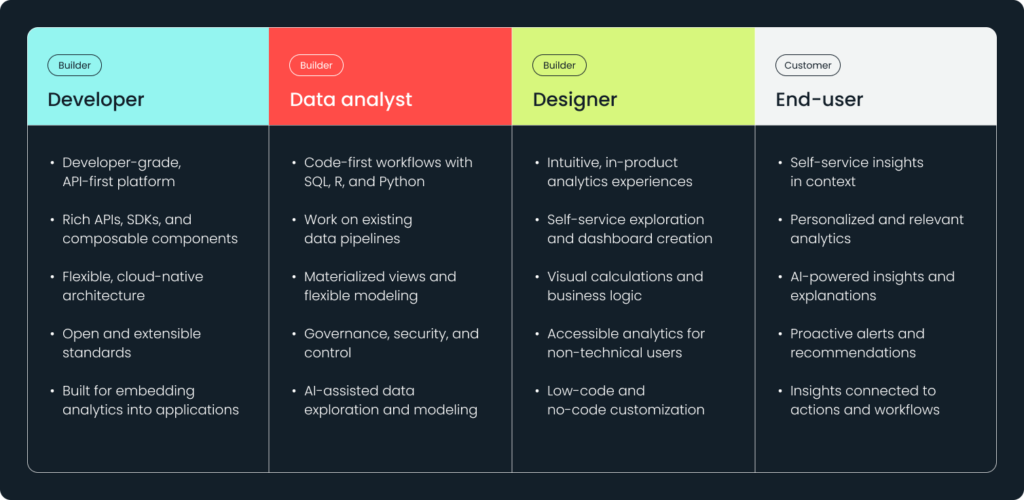
The platform supports the full spectrum of analytics creators, from developers and product teams to analysts and end-users. With a combination of no-code, low-code, and pro-code capabilities, teams can quickly build analytics experiences while maintaining the flexibility to customize and extend them as product requirements change.
The Sisense API-first architecture and developer tools allow teams to integrate analytics seamlessly into their apps. Using APIs, SDKs, and composable analytics components, organizations can create fully customized analytics experiences that match the design and workflows of their products.
At the same time, AI-powered capabilities help users interact with data more naturally. Features such as natural language queries, automated insights, and contextual explanations help users understand trends and patterns without requiring deep technical expertise.
By combining scalable architecture, flexible integration tools, and AI-driven analytics capabilities, Sisense enables organizations to move beyond traditional dashboards and deliver intelligent, data-driven product experiences. These experiences help users make better decisions directly within the context of the applications they use every day.
Summary
Today, teams compete on the quality of the digital experiences they deliver to their users. Data plays a central role in those experiences. When analytics is embedded directly into their apps and workflows, it helps users understand what’s happening, why, and what actions to take next.
Embedded analytics has evolved significantly over the past decade. What was once embedding static dashboards is now interactive exploration, AI-powered insights, and contextual recommendations delivered directly within apps. These experiences help users move from simply viewing data to understanding patterns, making decisions, and taking action.
As a result, analytics is becoming a core product capability. Product teams are increasingly using embedded analytics to improve user engagement, differentiate their offerings, and create new value for customers. In some cases, analytics even becomes a revenue-generating feature within a product.
Selecting the right analytics platform is an important strategic decision. Product, engineering, and data leaders evaluate not only visualization capabilities, but also the platform’s ability to integrate with existing tech, look and feel like their product, leverage AI-powered insights, and scale as their products and user base grow.
When evaluating embedded analytics platforms, consider the following best practices.
Do
Consider
Modern analytics platforms need to support both builders and end-users. It’s a tall order. The right platform must provide the tools needed to create data-driven product experiences while also making analytics accessible to a wide range of users, no matter their tech skills.


Subscribe to the Sisense newsletter
Get monthly insights on building smarter products with AI-powered analytics, from industry trends to real Sisense use cases.