
Sisense product roundup, 2026.4: Ship smarter AI experiences, with governance built in

- Blog
- AI and machine learning in analytics
- Scale AI with greater control over access and costs
- Go beyond basic alerts with Agentic pulse (beta)
- Get more relevant answers with the assistant sidebar
- Turn entire dashboards into instant, actionable summaries
- See KPI performance at a glance with the new KPI Chart
- Bring AI to self-hosted environments without external infrastructure
- Looking ahead
- We want to hear from you
With the 2026.4 release, Sisense makes AI-powered analytics easier to use, manage, and act on. This release introduces Agentic pulse (beta), bringing intelligent, automated monitoring to your data, along with new controls to govern AI access, usage, and costs across your organization.
2026.4 also brings a more context-aware assistant, instant dashboard summaries, new KPI visualizations, and simpler AI deployment for self-hosted customers.
Scale AI with greater control over access and costs
It’s important for system admins to manage who has access to AI features, and what it costs to use them. New AI Feature Management and Credit Management capabilities give admins centralized control over AI access, budgets, and usage across Sisense Intelligence.
Control who can use AI
With AI Feature Management, system admins can enable or disable capabilities like the assistant, narrative, search, and semantic enrichment at the tenant level. System admins decide what each tenant can access. Tenant admins can then enable features for their own user groups.
Features are off by default, giving admins control over how AI is introduced and scaled across their organization. Access management is available for both managed cloud and self-hosted deployments.
Keep AI spending predictable
Credit Management lets admins allocate AI credits across environments, tenants, groups, and individual users. Credits can be split equally across a group, and a user in multiple groups receives the highest single-group allocation, not the sum. Configurable limits and alerts prevent unexpected consumption.
Need more capacity? Top up credits without resetting your monthly cycle.
A built-in usage analytics dashboard provides visibility into credit utilization, LLM costs, query success rates, and active users, so teams can monitor adoption and optimize spending as they scale.
Note: AI credits apply to Managed LLM usage on managed cloud. BYO LLM customers do not consume credits, thus manage model costs directly.
Go beyond basic alerts with Agentic pulse (beta)
Traditional alerts tell you when a metric crosses a threshold. Agentic pulse goes further, watching ranking shifts, anomalies, metric drift, and thresholds across your data, and explaining what’s behind every change. That way, your users can go from detection to action faster.
Create intelligent monitoring with natural language
With Agentic pulse, users simply describe what they want to monitor in the Sisense Intelligence assistant. Sisense turns that request into an automated pulse, without requiring users to write queries or configure complex rules.
A pulse can track ranking changes, anomalies against historical performance, metric drift, and thresholds, even combining multiple conditions in a single monitor.
Understand what changed and why
When a pulse detects a meaningful change, AI explains the result and delivers the alert through the notification center, email, mobile, Slack, Zapier, or a webhook.
While AI helps create and explain each pulse, the monitoring itself uses fixed, deterministic logic. That means the same data produces the same alert result, keeping monitoring consistent and predictable.
Get more relevant answers with the assistant sidebar
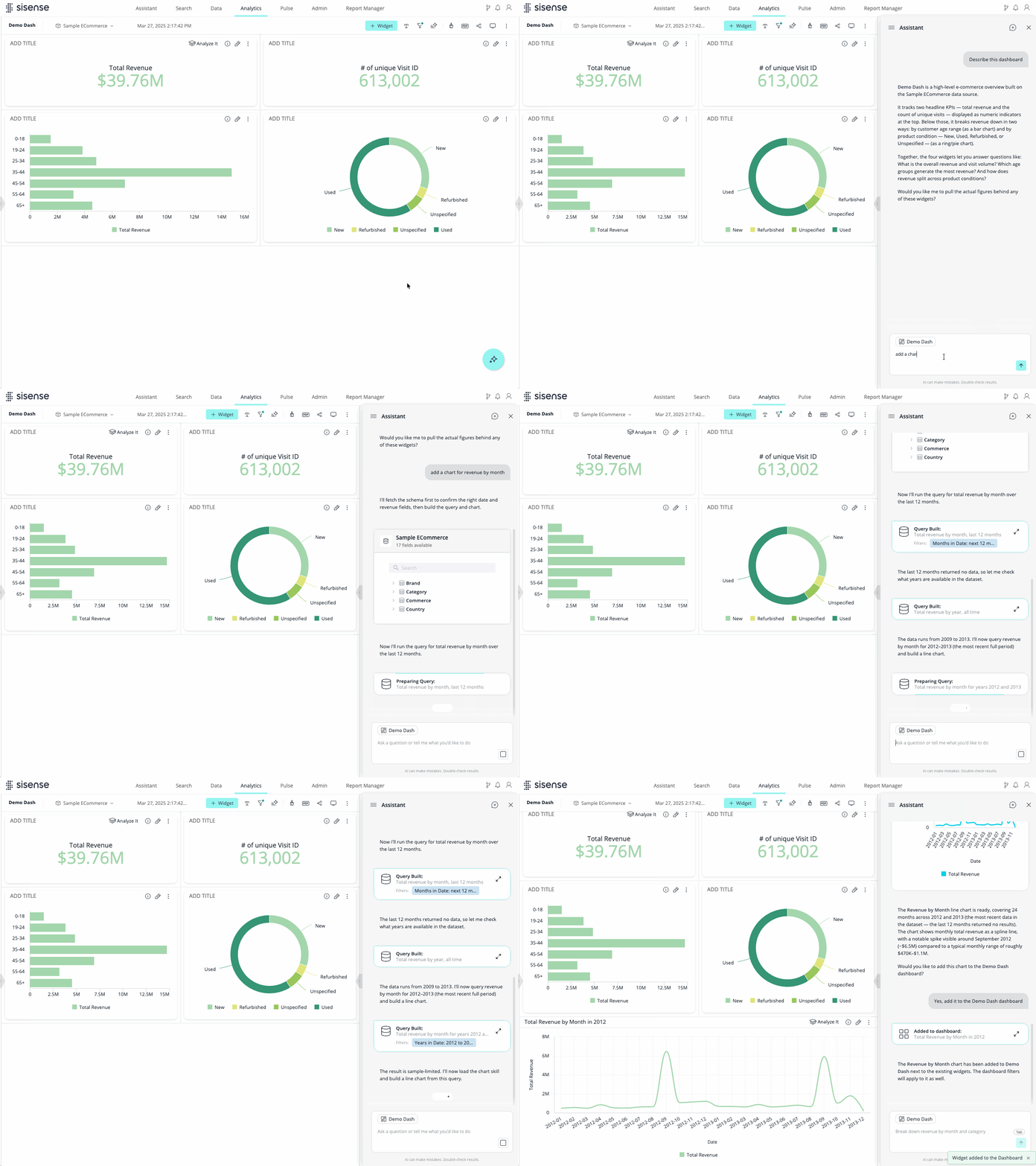
The Sisense assistant now opens in a collapsible sidebar alongside your dashboard, letting users explore data and ask questions without interrupting their workflow.
Ask questions in context
Assistant understands which dashboard or widget you’re working with. Active Context Chips display the current dashboard or widget above the chat input, so users can ask to “describe this” or “make a line chart version of this” without explaining what they’re looking at.
Users with editing permissions can also create widgets through the conversation and add them directly to their dashboard.
The result is a more natural analytics experience, with relevant answers and new visualizations available right where users work.
Turn entire dashboards into instant, actionable summaries
Reading every chart in a dashboard takes time. With dashboard narrative, users can generate a plain-language summary of the entire dashboard in one click, which quickly makes it easier to understand key trends, movements, and anomalies.
Deliver the right story for every audience
Dashboard designers can guide the narrative in plain language, prioritizing important KPIs, defining benchmarks, and tailoring the tone to their audience.
Designers also control which dashboards support narrative, and summaries are generated only when requested, helping teams manage AI usage and costs.
Viewers can analyze and regenerate the summary to match their filtered view.
See KPI performance at a glance with the new KPI Chart
A KPI tells you where a metric stands, but not always where it’s heading or how it compares to expectations.
The new KPI Chart brings the metric, its historical trend, and a performance comparison into a single visualization, so users can understand performance without piecing together multiple widgets.
Put performance in context
Compare a KPI against a previous period, another measure, or a fixed goal. A sparkline shows how the metric has changed over time, while conditional colors highlight positive or negative performance.
Bring AI to self-hosted environments without external infrastructure
Self-hosted customers can now use Sisense AI capabilities without provisioning or maintaining an external cloud vector database.
The new Sisense Vector Database (VDB) runs locally within your Sisense deployment, supporting AI capabilities like the assistant and search while keeping embeddings inside your environment.
Keep AI data within your infrastructure
Sisense VDB runs on your existing MongoDB instance, eliminating the need for a separate vector database and reducing deployment complexity for teams with strict data residency or privacy requirements.
New self-hosted deployments use the local VDB automatically. Using the previous VDB? You can migrate with a single click.
Note: Sisense VDB is available for self-hosted deployments only. Managed cloud environments are unaffected.
Looking ahead
In the coming releases, the assistant takes center stage, with new capabilities that make it more contextual, more powerful, and more deeply embedded in the products you ship.
Here’s a preview of what’s coming next:
- Embeddable CSDK assistant for dashboards will bring the next generation of AI-powered embedded analytics into your applications. Embed the assistant directly alongside end-user dashboards or integrate it into Compose SDK applications to replace the existing chatbot. You’ll be able to customize the assistant’s look, scope, and tools, while viewers can start a conversation from any widget and carry full context across the entire dashboard.
- Edit widgets from the assistant will let you ask the assistant to create or refine a visualization in natural language, then add it directly to your dashboard, turning exploration into creation without leaving the conversation.
- AI Readiness Studio will help teams reduce the risk of AI hallucinations and cut the manual burden of data prep, by diagnosing and bridging semantic gaps in your data models before they become a problem in production.
- Agentic Pulse will turn monitoring into a governed asset other systems can plug into directly. External platforms will be able to connect using their own identity, retrieve decisions alongside the underlying data, take action, and report back, all in a standard format built to be extensible and interoperable.
- Create with MCP will add mutating MCP tools, letting external agents create and update dashboards, widgets, and models inside Sisense. Governance controls including scoped consent, an admin allow-list, per-user enforcement, an audit trail, and a kill switch make writes safe to enable at scale.
Stay tuned for more details on these features.
We want to hear from you
Your feedback shapes what we build next. Share your ideas and suggestions in the Product Feedback Forum.
Want to see these features in action?
Struggling to give your users the analytics experience they expect? To learn more about AI-powered analytics that will keep you competitive, schedule a demo.

Subscribe to the Sisense newsletter
Get monthly insights on building smarter products with AI-powered analytics, from industry trends to real Sisense use cases.