
Sisense product roundup: Smarter AI responses, data modeling flexibility, and embedded workflows in 2026.2

- Blog
- Embedded Analytics
A simpler path to AI adoption, with Sisense-managed LLM and Sisense Credits
Sisense-managed LLM was introduced earlier this year as a simpler way to run Sisense Intelligence on managed cloud. With this release, Sisense Managed LLM is paired with Sisense Credits, a new consumption model that makes AI budgeting and spend predictable and easy for admins to govern
Sisense-managed LLM: AI ready out of the box
Sisense-managed LLM removes the need for your team to manage LLM setup and infrastructure. Sisense handles the model, security, and infrastructure in the background, so customers on managed cloud can use assistant, narratives, semantic enrichment, and the rest of Sisense Intelligence without deploying or maintaining an LLM of their own. This allows teams to get up and running on AI-powered analytics faster, expediting time to value.
Predictable AI consumption with Sisense Credits
A single pool of credits covers every supported AI action within the Sisense platform, from assistant queries to narrative generation and semantic enrichment. Each action is metered per use, not per token, so the same action always costs the same number of credits regardless of complexity.
Admins track consumption in real time from the Admin panel, with alerts at 85% and 100% of the monthly allocation. If a workspace does hit its limit, features are paused until the next refresh. Pausing features ensures that there are no automatic overages, helping teams avoid unexpected costs.
What this means for you:
- Faster time to value: AI features are available the moment a customer turns them on.
- Predictable economics: A fixed credit cost per AI action, with tokens tracked internally and credit consumption visible to admins.
- One pool, every capability: Credits flow across all AI features, so teams can scale what matters most instead of sizing each one in isolation.
- Scale as you grow: Start small and expand as AI adoption proves out, without locking into large upfront commitments.
Pick your path: Managed LLM, BYO LLM, or both
Managed LLM is available first for Sisense managed cloud customers. Bring Your Own LLM remains fully supported, credits are not consumed for BYO-LLM usage, and the two options can coexist on the same deployment.
To see how Credits map to specific AI actions, expected usage by team size, and the tiers available today, reach out to your Sisense account team or see the Sisense Credits pricing brief.
Get clearer, more contextual answers with the assistant
Sisense continues to evolve the assistant into a more useful, reliable interface for exploring data.
Natural-language analytical answers with built-in context (preview)
In this release, the assistant now answers quantitative questions with natural-language responses that include exact data values and concise insights, while continuing to generate the relevant visualization.
- Question-aware responses: The assistant adapts responses by query type, including:
- Quantitative. Direct answer plus insight.
- Creation requests. Creates the requested visualization and confirms the action with a brief insight.
- Comparison. Includes values, deltas, and percentages.
- Metadata / structural. Returns text-only field or definition information.
- Ambiguous questions. Asks clarifying follow-up questions with suggested options.
- Forecasting / trends. Summarizes projected direction alongside the visualization.
- No data found. Returns a clear text explanation without showing an empty visualization.
Assistant responses now respect shared filter context, meaning generated charts now align with active dashboard filters, ensuring consistent results across dashboards, NLQ, and assistant interactions.
This makes it easier to move from question to understanding, without needing to interpret charts on your own. It also helps ensure users are working off of the same context when exploring data.
Simplified flexibility for data modeling
This release expands what you can do directly in the modeling and dashboard layers, reducing the need for backend changes.
Create calculated dimensions directly in the widget (beta)
Business analysts and dashboard designers can now create new data grouping and categorization dimensions on the fly (e.g., Concat, Left, Right) directly within the widget editor, without requiring backend data modeling changes or ElastiCube rebuilds.
Use the widget editor for:
- Binning and grouping: Drag-and-drop values into custom groups (e.g., grouping “sku_124” and “sku_124_old” into “sku_124”).
- String manipulations: Functions to extract parts of text or reshape dates (e.g., LEFT(Region, 3)) to create new axis categories.
This makes it faster to iterate on dashboards and adapt to new analytical needs as they arise.
Expand analysis with outer joins
Outer joins are now available directly in the Sisense data modeling environment, supporting:
- Left joins
- Right joins
- Full joins
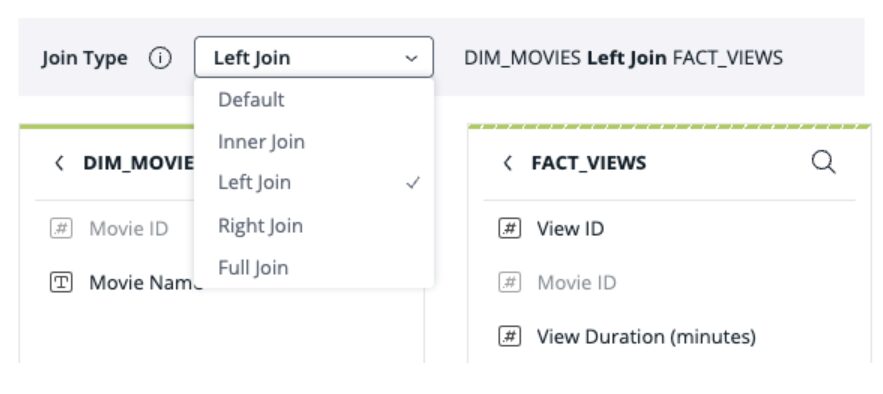
This enables dashboards to retain unmatched rows, providing more comprehensive analysis and making it easier to identify data integrity issues. Data modelers can execute joins directly within the user interface, minimizing the need to edit SQL or perform other manual operations. Outer joins are enabled by default for all existing and new users, and non-default join types are visually flagged in the data model.
This new feature improves data-modeler side controls by enabling data governance decisions earlier in the modeling process, before dashboard creation.
Build and embed analytics more efficiently
For developers embedding analytics into products, this release continues to improve the path from dashboard to application.
Generate Compose SDK embed code directly from dashboards
You can now generate code to embed a dashboard using Compose SDK. This allows you to:
- Reference dashboards by ID
- Choose your framework (React, Angular, VueJS)
- Configure whether users have access to a filter panel and dashboard toolbar
This update simplifies the transition from dashboard creation to embedded implementation and helps streamline collaboration between Sisense users and application developers. For more information about Compose SDK, see the Quickstart guide for using Compose SDK.
Better control over AI-generated narratives
Narrative capabilities are now managed through a unified administration setting, giving teams clearer control over how AI-generated explanations are used.
Admins can now:
- Enable or disable narratives across dashboards and widgets.
- Manage all narrative functionality from a single location, including API usage.
This creates a more consistent, governed approach to using AI-generated insights across the platform.
Looking ahead
For the rest of 2026, our focus will be on improving the AI experience, advancing our data strategy, and deepening our developer capabilities.
We plan to bring Natural Language Response to general availability, upgrade the assistant with transparent query logic and cross-session context, and extend our BYO LLM support to AWS Bedrock so customers can run Sisense Intelligence on the provider they already use.
For data modelers, we plan to progress ElastiCube Cloud toward general availability with larger capacity, so teams can move more of their workloads onto a fully managed, zero-infrastructure analytics layer.
For developers, we plan to extend Compose SDK with a plugins framework and an embeddable version of the assistant, allowing teams more flexibility to build analytics features that fit their product architecture.
Explore Sisense for 7 days, free, no strings attached.
Sisense now has pricing plans for everyone.
Free trial
We want to hear from you
Your feedback is crucial in shaping future releases, so be sure to voice your ideas and suggestions in the Product Feedback Forum. Stay tuned for more updates as we continue to push the boundaries of innovation together.
Curious about what you’ve seen? Check out the free trial
If you’re still exploring embedded analytics solutions and want to try Sisense for yourself, we’ve made it easier than ever. Our new free trial experience lets you get hands-on with the platform—no strings attached. And at any time during the trial, you can onboard Sisense with our new monthly pricing options.
Or, to learn more about analytics solutions that will keep you competitive, schedule a demo.


Subscribe to the Sisense newsletter
Get monthly insights on building smarter products with AI-powered analytics, from industry trends to real Sisense use cases.