
Sisense product roundup: AI connectivity, security, and smarter dashboards in 2026.1

- Blog
- Uncategorized
- Introducing the Sisense MCP Server (beta)
- Strengthen access for non-SSO users with email-based 2FA (beta)
- Create clearer, more intuitive dashboards with primary filters
- Broaden your data modeling capabilities with Outer Joins Control (beta)
- Build richer embedded experiences with Compose SDK improvements
- Looking ahead
- We want to hear from you
With the 2026.1.0 release, Sisense continues to focus on making analytics more accessible, flexible, and secure for teams building data-driven products. This release introduces major advancements like the new MCP Server for language-based interactions, stronger authentication for non-SSO users, and improvements in how end users interact with dashboards.
Below, we’ll walk through the most noteworthy customer-facing updates in this release and how they help teams build, embed, and scale analytics with confidence. Let’s dive into the highlights.
Introducing the Sisense MCP Server (beta)
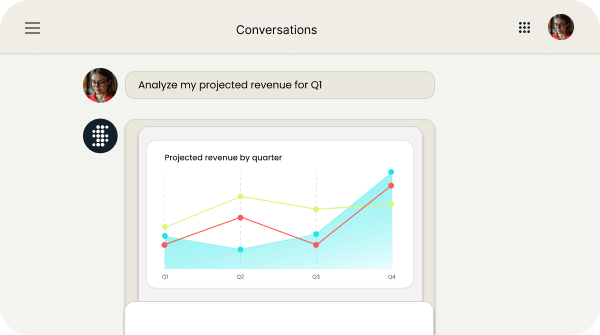
The Sisense MCP Server is now available in beta, opening the door for external AI agents to interact with Sisense through natural language, without requiring local setup.
The MCP Server acts as a hosted bridge, enabling AI assistants to connect directly to Sisense, allowing you to query your data, explore schemas, and generate charts, all through natural language.
Key capabilities include:
- Allowing AI agents to discover data sources and explore schemas
- Generating Sisense-styled charts from natural language prompts
- Accessing chart screenshots via HTTP
- Providing rich, text-based explanations alongside visual output
This approach enables executives and end users to get data-driven answers inside the AI tools they already use.
The MCP Server is designed with a clear evolution path, starting with standalone setups and moving to a fully hosted service with OAuth 2.1–based security. It’s a foundational step toward more autonomous, AI-driven analytics workflows.
These capabilities lay the groundwork for more intuitive, flexible analytics experiences, especially when combined with Sisense Intelligence features like the assistant.
Strengthen access for non-SSO users with email-based 2FA (beta)
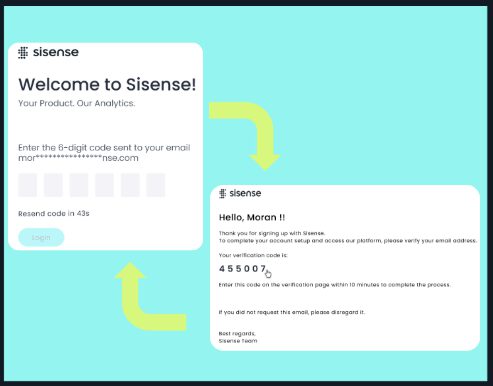
Security remains a top priority. In 2026.1, Sisense introduces email-based two-factor authentication (2FA) for native (non-SSO) users, now available in beta.
This out-of-the-box MFA option adds a one-time password (OTP) step after username and password login—no additional apps required.
What this enables:
- More secure access for external and non-SSO users
- Reduced risk of account compromise and unauthorized access
- Better alignment with regulatory and internal compliance requirements
This capability helps organizations meet industry and regulatory standards such as GDPR, HIPAA, and SOC 2, where multi-factor authentication is often required.
2FA is controlled through a global toggle and per-user settings, both turned off by default during beta.
Create clearer, more intuitive dashboards with primary filters
Primary dashboard filters, now generally available, make it easier to guide users through data in a way that reflects real business context.
Primary filters define the scope for the rest of the dashboard. When a user selects a value in a primary filter, all other filters automatically update to show only the values that are relevant within that context.
This means:
- Regular filters stay aligned with the primary selection
- Users avoid irrelevant options and empty results
- Dashboards are easier to interpret and explore accurately
By setting a clear context upfront, primary filters help create a simpler, more intuitive dashboard experience, especially for less technical users who rely on guided analysis.
Broaden your data modeling capabilities with Outer Joins Control (beta)
Outer Joins Control is now available in beta. This update empowers data modelers to define explicit outer joins directly at the data layer, unlocking broader analytical capabilities and ensuring that relevant data remains visible even without an exact match in related tables.
Unlike standard automated joins that can inadvertently hide unmatched records, this new level of control helps teams easily identify data integrity gaps and establish stronger governance over how data relationships are handled within your mode.
Build richer embedded experiences with Compose SDK improvements
For teams embedding analytics, Compose SDK continues to mature in this release.
Compose SDK mode is now enabled by default and supports additional visualization options, including:
- Calendar heatmaps for time-based analysis
- Tabber widgets to organize content across multiple tabs
These updates give developers more flexibility when designing embedded analytics experiences, especially for applications with complex dashboards or time-oriented data.
Looking ahead
In the second quarter of 2026 our focus will be on maturing the features we’ve just introduced and deepening our AI and developer capabilities.
We plan to bring Sisense-managed LLM to general availability, upgrade the Sisense Intelligence assistant reasoning, expand Outer Joins Control to cover more complex use cases, and introduce ElastiCube Cloud in beta. For developers, we plan to improve the GenAI components, allowing more flexibility to build analytics features their way, using flexible components that fit their product architecture.
Explore Sisense for 7 days, free, no strings attached.
Sisense now has pricing plans for everyone.
Free trial
We want to hear from you
Your feedback is crucial in shaping future releases, so be sure to voice your ideas and suggestions in the Product Feedback Forum. Stay tuned for more updates as we continue to push the boundaries of innovation together.
Curious about what you’ve seen? Check out the free trial
If you’re still exploring embedded analytics solutions and want to try Sisense for yourself, we’ve made it easier than ever. Our new free trial experience lets you get hands-on with the platform—no strings attached. And at any time during the trial, you can onboard Sisense with our new monthly pricing options.
Or, to learn more about analytics solutions that will keep you competitive, schedule a demo.


Subscribe to the Sisense newsletter
Get monthly insights on building smarter products with AI-powered analytics, from industry trends to real Sisense use cases.