Skip to Main Content

MARKETPLACE

Filter Panel Enhancements

By Paldi Solutions

  • Cascading
  • Customizable
  • Embedded
  • Filter
  • Filter enhancement
  • Group
  • OEM
  • User experience (UX)
  • User interface (UI)
OS Support
Windows
Linux
Supported Sisense Versions (Linux) Latest
Supported Sisense Versions (Windows) Latest
Last Updated April 22, 2026
Tags
cascading
customize
descendant filters
dialog
embedded
Filter
Filter enhancements
Filtering
filters
group
OEM

This Filter Panel Enhancements plugin introduces practical improvements to the native filter panel, helping you deliver the best possible interface and a cleaner filtering experience while keeping everything fully familiar for end users.

With new cascading-filter controls and a customizable filter dialog, Filter Panel Enhancements helps teams maintain consistent logic across dashboards and create a more focused, intuitive filtering environment.

A must-have addition for OEMs and organizations that require precise UI behavior.

Key Highlights & Features:

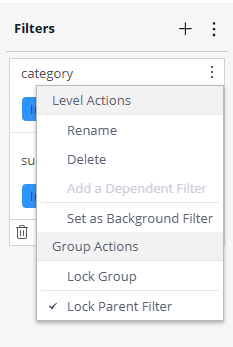
  • Lock Parent Filter:
    Lock the parent value inside a cascading filter group while still allowing viewers to modify the descendant filters.
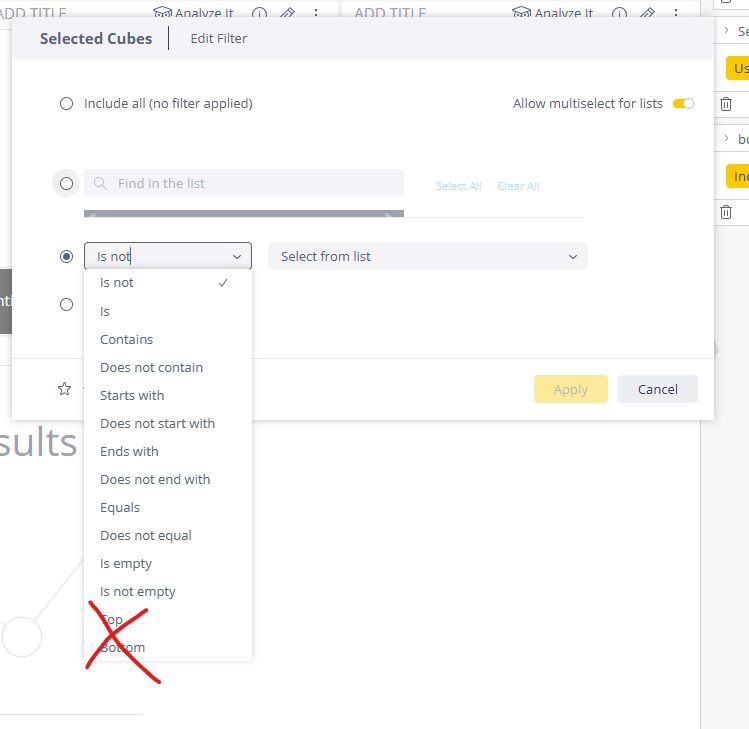
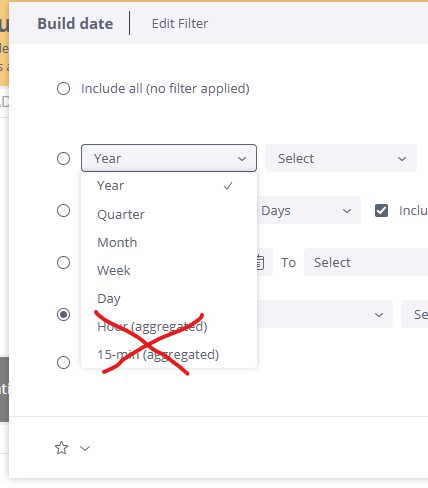
  • Hide Unnecessary Filter Options:
    Remove irrelevant options from Sisense’s native filter dialog across text, number, or date dimensions.
  • Rule-Based Configuration Controls:
    Define clear rules for how the filter dialog behaves for each dimension type.
  • Integrates Naturally:
    Built to blend seamlessly into Sisense’s native look and feel.

Screenshots:

Lock parent filter

1 (3)

Hide unnecessary filter options

2 (2)

3 (2)

Why It Matters

Filtering is one of the most frequent actions users take in Sisense.

When filters show irrelevant or confusing options, users lose trust in the results and are less likely to engage with the dashboard.

Clear, controlled filters make the dashboard easier to understand and prevent mistakes.

Ideal Use Cases

  • Dashboards that rely on cascading filters and need predictable, controlled behavior.
  • OEM deployments that require a consistent and simplified filtering experience across all dashboards.
  • Dashboards for non-technical users who need fewer, clearer filtering options.
  • Multi-tenant environments that must enforce the same filtering rules across tenants.


Contact us for a live demo and immediate free trial!

Simply send a request to [email protected]


Contact us for a live demo and immediate free trial!

Simply send a request to [email protected]

Two people on discussion

Subscribe to the Sisense newsletter