Free Trial

- Marketplace
Report Studio
Read More

MARKETPLACE
By QBeeQ
By default, every widget on a Sisense dashboard loads automatically when the dashboard opens and re-queries every time a filter changes. On dashboards with many widgets, that adds up fast: longer load times, heavier server load, and charts refreshing in the background while you’re focused on one.
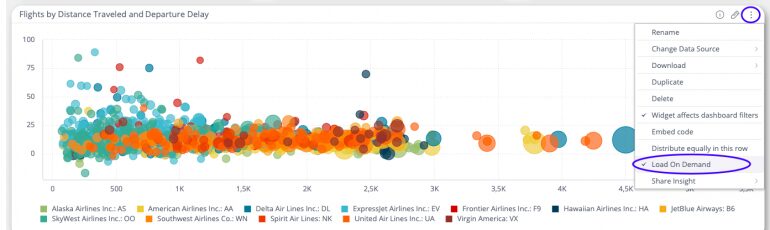
Load Widget on Demand lets dashboard designers configure individual widgets to skip automatic loading. Each widget shows a Refresh button instead. Viewers click it when they want that widget’s data, and it queries against whatever filters are currently active on the dashboard. Setup happens in the widget’s three-dot menu. No code, no configuration files.
Key Features
Ready to see Load Widget on Demand in action? Explore our live dashboard!
📄 Explore the Load Widget on Demand documentation here.
📌 Use Cases
Dashboards with heavy or slow-loading widgets: Pivot tables, scatter charts, and other complex visualizations can significantly slow down a full dashboard load. Enabling load on demand for those widgets lets the rest of the dashboard open quickly, while users pull the heavy data when they’re ready for it.
Dashboards used for sequential analysis: When users work through a dashboard in a specific order, not every widget is relevant at every step. Load on demand lets them control what runs, reducing noise and keeping focus on the data that matters at that moment.
Reducing unnecessary database load: Every automatic query has a cost. For dashboards with a large user base or resource-constrained environments, load on demand reduces the number of queries fired on open, particularly for widgets that most users never scroll to.
Questions about fit, pricing, or setup? We’re happy to help. Contact us. · Visit qbeeq.io.
Load Widget on Demand is included for free in the QBeeQ Starter PowerUp. No purchase required.Get the Starter PowerUp and unlock plugins that make your dashboards more powerful, intuitive, and built for real users.