On a standard US map, Texas and California dominate the visual. Rhode Island barely registers. When your metric is revenue per state, or adoption rate, or field workload, the size of the state has nothing to do with the number you’re trying to read.
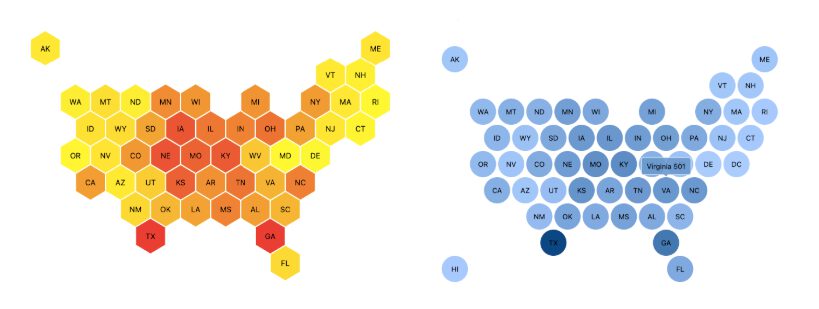
The Honeycomb Tile Map replaces the geographic outline with a grid of equal-sized tiles, one per US state, positioned to approximate their geographic layout. Each tile is colored by a value you select, using Sisense’s native conditional formatting. You choose between two tile shapes: hexagonal (Honeycomb) or square (Tile). State data can be passed as a two-letter abbreviation or a full state name.

Key Features
- Equal-sized tiles for all 50 states: Every state gets the same size tile regardless of geographic area. State input supports both two-letter abbreviations and full state names.
- Two display styles: Choose between Honeycomb (hexagonal tiles) or Tile (square tiles) using the Map setting in the widget configuration panel.
- Color by value or category: Use the Color setting to drive tile color from a numeric value or a categorical dimension. Combine with Sisense’s native conditional formatting on the Values field to set color thresholds based on your metric.
- Hover tooltips: Hovering over any tile displays a tooltip with the values mapped to your x-axis, y-axis, and value fields. Tooltips are on by default and cannot be disabled.
Ready to see the Honeycomb Tile Map in action? Explore our live dashboard!
📄 Explore the Honeycomb Tile Map documentation here.
📌 Use Cases
Comparing performance across states without size bias: When you’re tracking revenue, adoption, or operational metrics by state, a standard map makes large states look more significant than they are. Equal tiles give every state the same visual weight, so the color does the work, not the geography.
National campaign and field operations dashboards: Sales teams, field operations managers, and marketing analysts tracking state-level performance need to scan across all 50 states. A tile layout makes scanning faster and more accurate than a geographic outline, where small states get lost.
Executive and embedded analytics views: The plugin is optimized for dashboard performance and works within Sisense’s standard widget framework. It fits cleanly into dashboards built for regular use, not just one-off presentations.