The Paldi “Advanced Filters” plugin advocates the “zero coding” approach for customization – you will get an enormous amount of filters capabilities, logic, and styling within one simple design toolbar.

Key Highlights
- Highly interactive, user friendly dropdown filters widget.
- Super flexible layout. Tons of styling options.
- Special behavior within PDF Exports.
- Allow your users to save selections as “Segments” of their data.
- Works great with high cardinality dimensions (even million of values).
- Powerful filters dependency engine developed by Paldi.
- Integrated with the metadata plugin (for translation purposes).
- Can be bought as part of our “UI Enhancements Bundle” which includes:
- Immediate free trial + access to demo env is available.

Key Features
- Single Selection vs Multi Selection.
- Date Range option for Date fields including an option to offer a Restricted Range instead.
- Excel like Search & Select functionality.
- Option to lazy load values when the dimensions are very big.
- Fully customize the style and layout of the dropdowns from the design panel.
- Control whether to use Apply/Reset buttons (also fully customize their look & feel).
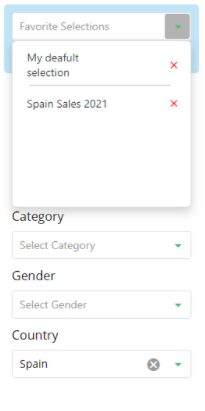
- Viewers can define and save filters selection to as their favorite selections (data segmentation).
- Option to use different dependency modules between filters.
- When exporting to PDF – use the widget to show styled labels of the filters and their selections instead of images of dropdowns.
- Other filter widgets by Paldi:
Widget:

Advanced filters widget within a dashboard:

Date Range selection example:

Design Panel Options:

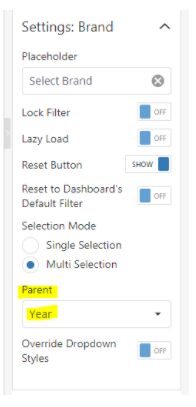
Dependent Filters settings:

Filters Dropdown Styles:

Favorite presets:

Contact us for a live demo and immediate free trial!
Simply send a request to [email protected]