
Sisense product roundup: MCP, AI-powered search, and smarter modeling in 2026.3

- Blog
- AI analytics fundamentals and trends
- Connect AI agents to your data with MCP Server (beta)
- Find the right insight instantly with Sisense Intelligence search
- Extend your product with Compose SDK Plugins (beta)
- Build data models faster, from upload to final product
- Troubleshoot as any user, with a full audit trail
- Looking ahead
- We want to hear from you
With the 2026.3 release, Sisense continues to advance AI-powered analytics across the full builder workflow. This release introduces MCP Server (beta), bringing governed data access to external AI agents.
This release also brings new tools to help your users find insights faster, model data conversationally, and extend analytics experiences with custom visualizations.
Connect AI agents to your data with MCP Server (beta)
Your users are already working in AI tools like Claude, ChatGPT, and Cursor. With the Sisense MCP Server, now in beta, they can get governed answers from your data without ever leaving those tools. Any MCP-compatible AI agent can explore your data and build charts through Sisense, scoped to each user’s existing permissions and grounded in your semantic model.
No install, no shared credentials
The MCP Server is a fully hosted endpoint secured with OAuth 2.1. There is nothing to install, no shared API key, and no service account to manage. Each connection uses a short-lived, per-user credential that expires automatically.
Governed by design
Every agent request runs under the signed-in user’s existing permissions, so people only see what they are already allowed to see. And because agents work against your semantic model rather than raw tables, answers reflect your metrics and definitions, not ad hoc interpretations that drift from what your business actually means.
What agents can do
Once connected, an agent can:
- Find the right data without digging through the platform.
- Ask questions in natural language and get answers in plain language, grounded in your actual metrics.
- Turn an answer into a chart within that conversation, without switching tools.
- Build on previous answers to go deeper, using results from earlier in a session, without starting over.
In clients that support interactive content, such as Claude, charts render live inside the conversation.
Note: MCP Server is available in 2026.3.1 and later for managed cloud and self-hosted deployments. The AI-powered query and chart tools require Cloud-Linked Features enabled on your instance.
Find the right insight instantly with Sisense Intelligence search
With Sisense Intelligence search, users can type what they’re looking for in plain language and instantly surface validated widgets that already live in their dashboards.
Intent-driven, permission-scoped discovery
Rather than navigating dashboard structures or guessing where an analysis lives, users describe what they need and Sisense Intelligence search surfaces the right widget, ranked by relevance, scoped to what they’re already allowed to see.
This works for two distinct user groups:
- Viewers find answers without needing to understand the data structure or know which dashboard to open.
- Designers check whether an analysis already exists before building a new one, reducing duplication and keeping dashboards clean.
Every result comes from analyses that are already trusted and dashboard-resident. Relevance ranking filters out weak matches, so the top result is ready to act on.
Governed by existing permissions
Search results are scoped to each user’s existing access rights automatically. No new permissions surface to configure or manage. What a user is entitled to see governs what they find.
Extend your product with Compose SDK Plugins (beta)
Compose SDK Plugins is now in beta, giving developers a new way to extend Sisense with custom visualizations that feel native to their own applications.
Build custom visualizations that fit your product
Plugin authors can now define custom React-based widgets and register them directly in Compose SDK and Fusion. Once registered, those widgets appear throughout the Fusion UI, in the widget picker, the New Widget popup, and the widget editor, alongside native Sisense widget types.
Want to use third-party libraries to visualize your data? Add the dependencies to your plugin. Or, if you know the behavior, use case, and look and feel you want, but aren’t sure which library to use, the built-in /design-custom-widget skill can help you choose.
customWidget: {
   name: 'plotly-heatmap',
   displayName: 'plotly-heatmap',
   visualization: {
     Component: HeatmapChart,
   },
   designPanel: {
     Component: HeatmapDesignPanels,
   },
   dataPanel: {
     config: {
       inputs: [
         {
           name: 'categories',
           displayName: 'Categories',
           type: 'dimension',
           maxItems: 1
         },
         {
           name: 'value',
           displayName: 'Value',
           type: 'measure',
           maxItems: 1
         },
         {
           name: 'breakBy',
           displayName: 'Break By',
           type: 'dimension',
           maxItems: 1
         }
       ],
     },
   },
Design and embed without leaving your workflow
Each new plugin begins its journey right where developers work: in IDEs like VS Code and Cursor, or AI coding agents such as Claude Code. A single command creates the plugin development project, while built-in AI skills provide a simple Q&A workflow that guides you through the design, configuration, build, and deployment of your plugin to the connected Sisense instance, all without writing a single line of code.
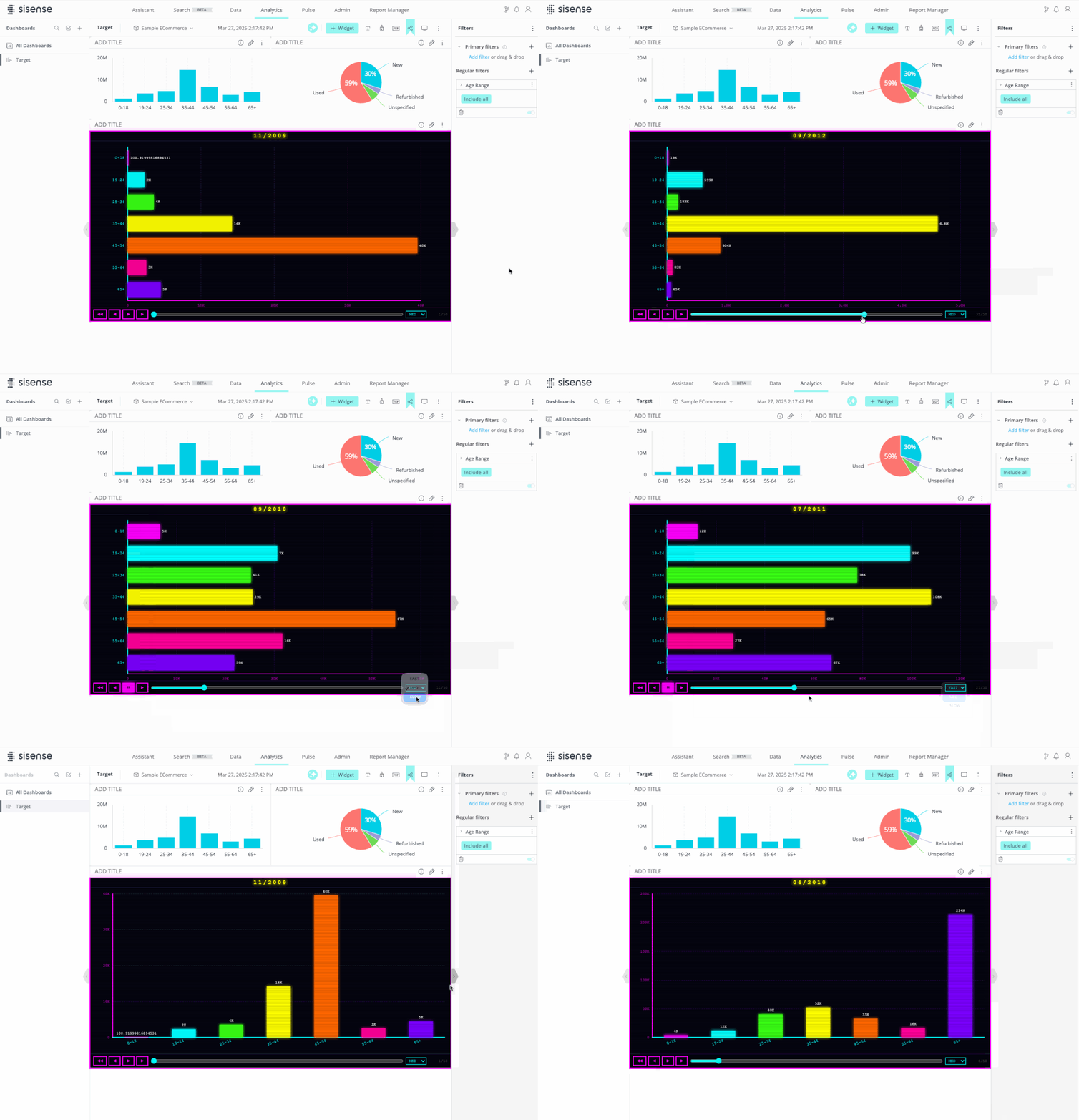
Run the included development server locally to preview, test, and iterate on your plugin. Don’t forget to add your new plugin as a Git repo. When you’re ready to see it in Fusion, run the deploy command again or let your agent handle the deployment.
One plugin source, written in React, works seamlessly everywhere: Fusion, Fusion Compose SDK Mode, Compose SDK (including React, Angular, and Vue frameworks).
Cross-filtering that works across the stack
Plugins now support automatic cross-filtering in both Fusion and Compose SDK environments, so custom widgets participate in the same filter interactions as native ones, and the experience stays consistent across your analytics.
Build data models faster, from upload to final product
This release gives teams more ways to build and iterate on data models, whether you are starting from raw data in the assistant or making on-the-fly adjustments directly in the widget editor.
Start from scratch in the assistant
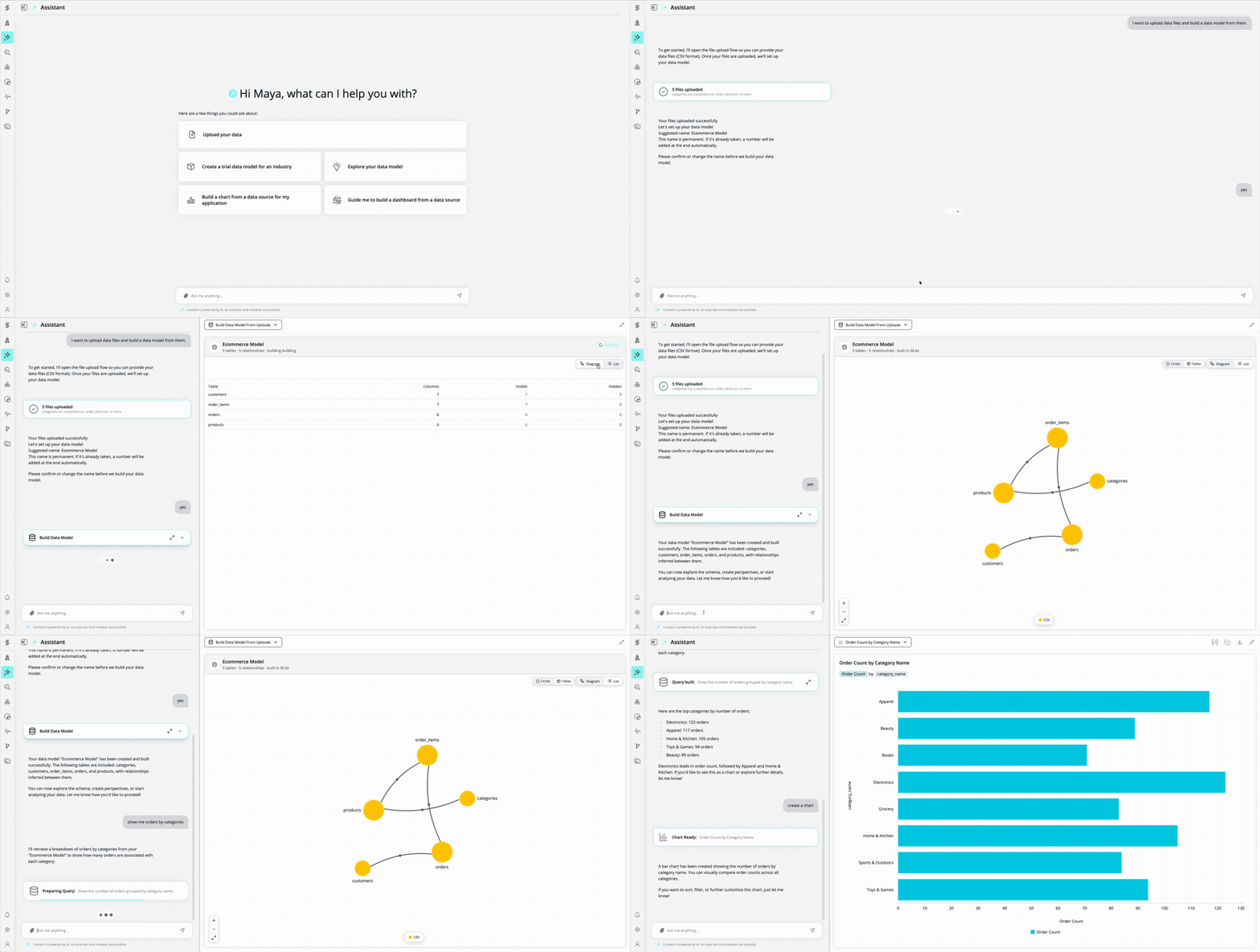
Data Modeling Agent is now generally available, giving users a way to go from raw data to a working, queryable model entirely from within the assistant. Upload CSVs, define relationships, and build the ElastiCube by chatting through the process. No tab switching, no separate modeling screen, no manual modeling expertise required.
Ready to use across the platform
The resulting model feeds directly into your dashboards, embedded analytics, and APIs with no additional handoff step. Once the model is ready, it is ready to use across the platform.
You stay in control
The agent proposes each next step rather than applying changes automatically. Nothing updates without your approval, so you can move quickly without losing visibility into what is being built and why.
Built for fast onboarding, useful beyond it
The agent is designed first for teams starting with raw data, where the path from “I have a CSV” to “I have something I can query” is longest. It also supports a secondary flow for refining and improving existing data sources as needs evolve.
Create calculated dimensions directly in the widget (GA)
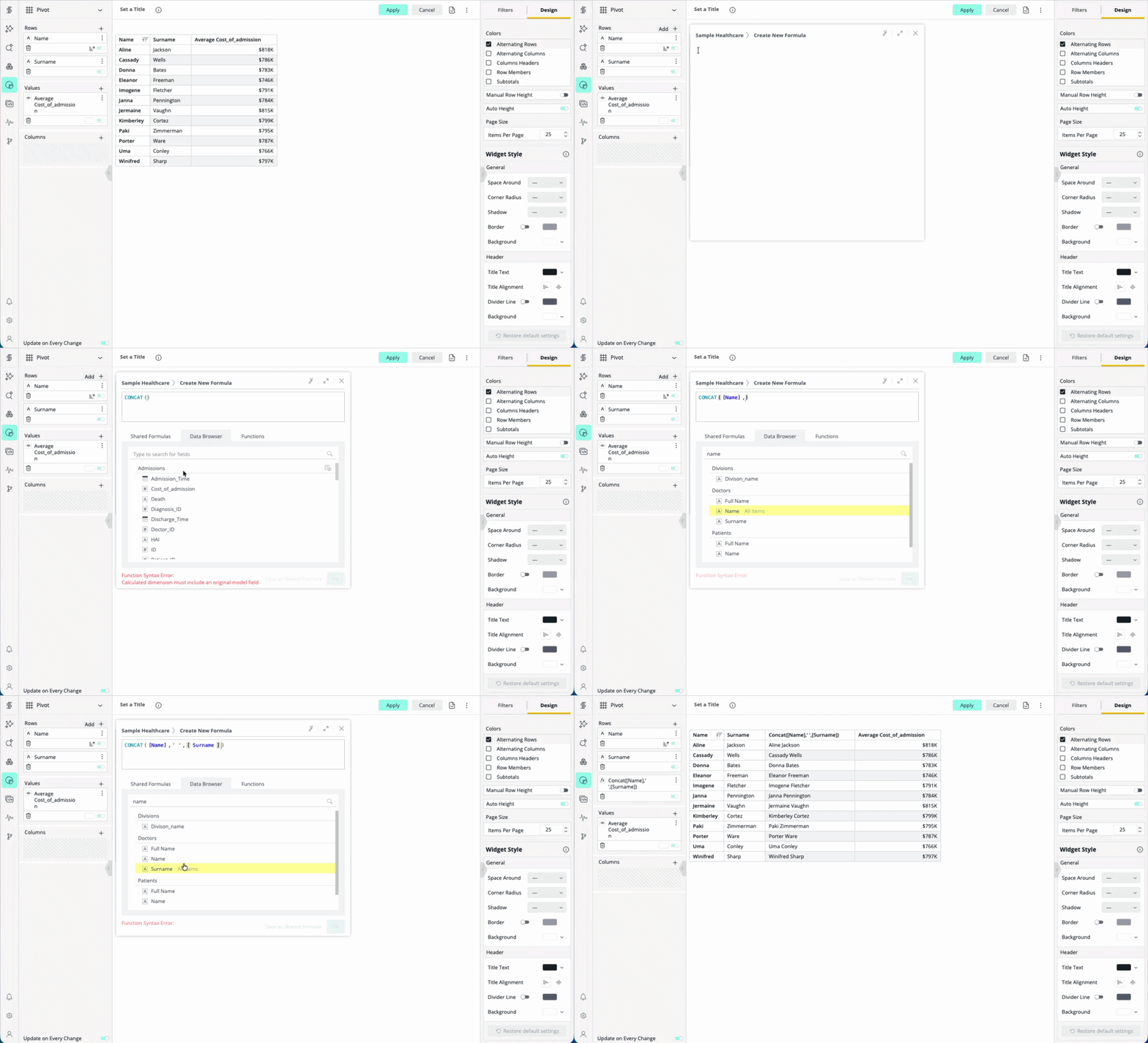
Business analysts and dashboard designers can now create new data grouping and categorization dimensions on the fly (e.g., Concat, Left, Right) directly within the widget editor, without requiring backend data modeling changes or ElastiCube rebuilds.
Use the widget editor for:
- Binning and grouping: Drag-and-drop values into custom groups (e.g., grouping “sku_124” and “sku_124_old” into “sku_124”).
- String manipulations: Functions to extract parts of text or reshape dates (e.g., LEFT(Region, 3)) to create new axis categories.
This makes it faster to iterate on dashboards and adapt to new analytical needs as they arise.
Troubleshoot as any user, with a full audit trail
Admins can now impersonate lower-tier users directly from the Admin panel, making it possible to reproduce reported issues and verify per-user configurations exactly as that user sees them, without workarounds or support scripts.
One click to start, one click to return
Impersonation is available as a row action on the Users table in both the Fusion admin grid and the new React admin UI. Once active, a persistent banner identifies the session and confirms that all actions are being audited under the admin’s account. Returning to the admin session is a single click.
Built around strict access controls
Impersonation follows a strict hierarchy. Only super admins, admins, and tenant admins can initiate a session. An actor can only impersonate a role strictly below their own, and tenant admins are confined to their own tenant. Users at the data admin level and below cannot initiate impersonation under any circumstance.
Every session is audited
Every action taken during an impersonation session is logged under the initiating admin’s account, not the impersonated user’s. This replaces the ad hoc workarounds that admins and support teams have used previously with a governed, audited, in-product path.
Looking ahead
In the fourth quarter of 2026, our focus will be on deepening the AI experience, expanding analytics capabilities, and giving developers and data teams more flexibility across the platform.
We plan to:
- Extend BYO LLM support to AWS Bedrock, coming before Q4.
- Bring the assistant into a side panel experience so it lives alongside your dashboards rather than replacing them.
- Add new visualization types and query capabilities to give builders and viewers more ways to explore and present data.
- Extend the narrative functionality to dashboards.
- Add composable embedding options to Sisense Intelligence search, and support in assistant.
- Add custom AI context to improve how assistant understands of your data and business definitions.
- Introduce governance controls over who has access to AI features across your tenant.
- Surface detailed usage analytics on the questions users ask and how AI credits are consumed.
- Extend assistant support to GCP-hosted models.
- Make it easier for self-hosted customers to enable advanced privacy options by hosting a vector database as part of Sisense.
Stay tuned for more details on these features.
We want to hear from you
Your feedback is crucial in shaping future releases, so be sure to voice your ideas and suggestions in the Product Feedback Forum.
Curious about what you’ve seen?
Struggling to give your users the analytics experience they expect? To learn more about analytics solutions that will keep you competitive, schedule a demo.



Subscribe to the Sisense newsletter
Get monthly insights on building smarter products with AI-powered analytics, from industry trends to real Sisense use cases.